We can identify which type of edition we are using in multiple ways as shown below.


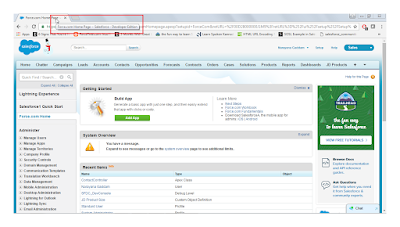


1. Click on Administer or any link under Administer from sidebar setup page then you can see the name of the edition.

2. Navigation: Setup ---> Administer ---> Company Profile ---> Company Information.

3. On different browsers:
a). Google Chrome, Internet Explorer, Mozilla Firefox: Hover the mouse over the tab where salesforce org is opened as shown below.


4. Using below SOQL from Query Editor in Developer Console or in Apex code.
SOQL Query: SELECT Organizationtype FROM organization
SOQL Query: SELECT Organizationtype FROM organization

We can find different type of editions using Schema object from "Execute Anonymous Window" in Developer Console or in Apex code.
Code snippet:
Schema.DescribeFieldResult dfr =Schema.sObjectType.Organization.fields.OrganizationType;
List<String> values = new List<String>();
for(Schema.PicklistEntry ple : dfr.getPicklistValues()){
values.add(ple.getValue());
List<String> values = new List<String>();
for(Schema.PicklistEntry ple : dfr.getPicklistValues()){
values.add(ple.getValue());
}
system.debug(JSON.serialize(values));
system.debug(JSON.serialize(values));

Where Team Edition and Base Edition are called as Group Edition and Performance Edition respectively.
--- Thank you for referring the post ---

